
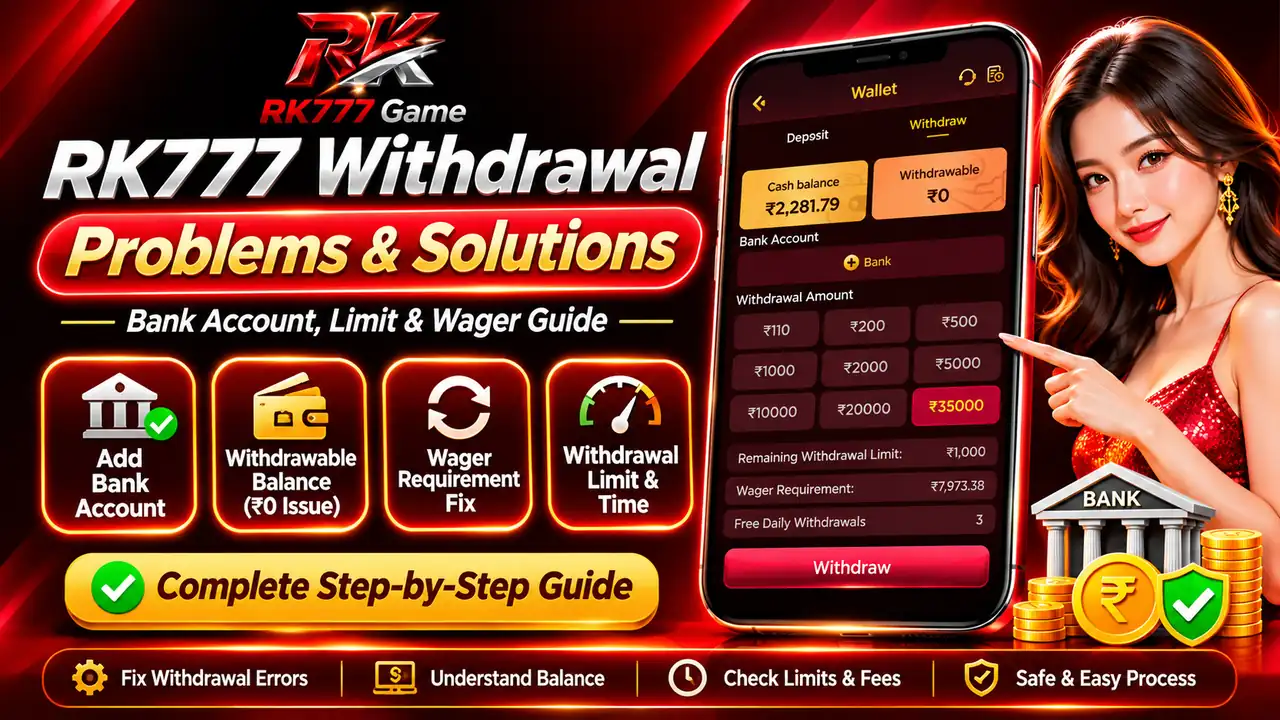
A withdrawal may be unavailable even when your RK777 wallet shows a cash balance. The Cash balance and Withdrawable fields describe different amounts.
This guide explains RK777 bank setup, account details, withdrawal limits, wager requirements and what to check if a request fails or stays pending.
Start with the balance and bank checks before entering any financial details. Never share a password or one-time verification code with anyone claiming to resolve a payment problem.
Go straight to the relevant instructions.
On this page
- Why RK777 Withdrawal May Not Work
- Bank Account Required Message
- How to Add Your Bank Account
- Cash Balance vs Withdrawable Balance
- Wager Requirement Explained
- Withdrawal Limits and VIP Details
- Bank Commission and Processing Time
- Withdrawal Troubleshooting Steps
- Pending or Failed Withdrawal
- Banking and Account Security
- Information to Give Support
- Frequently Asked Questions
- Final Withdrawal Checklist
Why RK777 Withdrawal May Not Work
Start by matching the screen message with the likely reason. A successful deposit or a visible cash balance does not automatically mean a withdrawal is eligible.
The app asks you to add bank details before proceeding.
Check the amount currently eligible, not only the cash balance.
The account shows an unmet activity or turnover requirement.
Review withdrawal history, payment details and any error shown.
The exact available options, fees and requirements may differ between accounts or change within the app.
Bank Account Required: What the Message Means
The RK777 withdrawal screen may display “Bank account required” and asks the user to add a wallet account first.
- Open Wallet → Withdraw.
- Under Bank Account, look for the + Bank option.
- If the prompt appears, use Add Card to open the bank details form.
- Do not enter someone else’s bank account details.
How to Add a Bank Account on RK777
The bank account setup form includes fields for Account Holder Name, Account Number and IFSC, followed by a Save & Continue button.
- Open the Withdraw tab.Choose the Bank Account field or Add Card option.
- Enter the legal account-holder name.Use the name registered with your bank, not an abbreviated nickname.
- Enter the account number carefully.Double-check every digit before continuing.
- Enter the IFSC code.The on-screen form expects an 11-character IFSC.
- Review and save.Check the information before tapping Save & Continue.
Cash Balance vs Withdrawable Balance
Cash balance and withdrawable balance are different. Consider this example account state:
The amount displayed as cash balance.
The amount displayed as eligible for withdrawal at that moment.
If the withdrawable amount is zero, do not assume the withdrawal button is malfunctioning. Review the app’s displayed eligibility and account information before attempting another request.
What Does Wager Requirement Mean?
The example screen displays Wager Requirement: ₹7,973.38. This is a platform-displayed requirement, not extra money you should automatically deposit.
- Read the applicable bonus or activity terms before making any decision.
- Check which activities count toward the requirement, if the platform explains them.
- Confirm whether the displayed figure updates after eligible account activity.
- If the amount looks incorrect, ask support for an explanation with a transaction breakdown.
- Do not keep depositing or spending money simply to chase a withdrawal.
Any applicable turnover conditions, restrictions and eligibility rules need to be checked against the terms shown on the account.
Withdrawal Limits, VIP Daily Limits and Free Withdrawals
The sample wallet shows Remaining Withdrawal Limit: ₹1,000, VIP Daily Limit: ₹1,000 and Free Daily Withdrawals: 3.
Amount the interface shows as available within the relevant limit.
The daily threshold displayed for that example account.
Number of free withdrawals shown in the wallet interface.
Review the displayed eligible balance and limits together.
The example values are not universal limits. Use the values shown in your own wallet, and check relevant terms if they conflict.
Bank Commission and Withdrawal Processing Time
The illustrated wallet details include a bank commission formula and a normal processing-time estimate. These values may change and do not guarantee payment.
- Bank commission: ₹6 + 3% of the withdrawal amount.
- Processing estimate: about 24 hours under normal circumstances.
- Fees and timelines should always be checked again on the current withdrawal screen.
For example, applying the displayed formula to a ₹1,000 withdrawal would calculate ₹36 in commission, before considering any other applicable conditions. This is only an illustration of the displayed formula.
When a payment is delayed, avoid multiple duplicate withdrawal attempts unless the platform specifically instructs otherwise.
Step-by-Step RK777 Withdrawal Troubleshooting
- Check Withdrawable, not only Cash Balance.If it shows zero, inspect eligibility before proceeding.
- Review the Bank Account section.Confirm bank details are saved and correct.
- Check the on-screen limits.Look at remaining limit, daily limit and any available options.
- Read the wager or bonus terms.Identify the requirement and ask for clarification if it is unclear.
- Check withdrawal history.Look for Pending, Failed, Rejected or Completed status, if available.
- Contact support with relevant evidence.Share the error text and transaction reference, but never credentials or OTPs.
RK777 Withdrawal Pending, Failed or Not Received
If a request has already been submitted, check its status before starting again.
Record when you submitted the request and follow the current platform guidance.
Review the displayed reason and check bank details and eligible balance.
Verify the destination account and ask support for a transaction reference.
Check account history and avoid repeated submissions without confirmation.
Save your own transaction details privately. If the platform will not explain a payment issue, consider contacting your bank or an appropriate consumer assistance channel.
Bank Account and Withdrawal Security Checks
- Use the application or support channel you independently verified.
- Never send OTPs, passwords, PINs or full card details to support agents.
- Check the exact spelling of a support link before opening it.
- Keep bank information out of public comments and social groups.
- Avoid transferring an extra fee to a personal account to “unlock” a withdrawal.
- Do not assume an app interface proves regulatory approval or payment safety.
Online real-money gaming and payments may be restricted by location or law. Check applicable rules before participation.
What to Prepare Before Contacting RK777 Support
If the problem persists, share enough information for the support team to identify the error without exposing sensitive credentials.
- Exact error text or a redacted screenshot.
- Withdrawal request time and amount.
- Displayed status and any transaction reference.
- Whether Bank Account setup is completed.
- Relevant wallet balance and eligibility fields.
- The troubleshooting steps already attempted.
Do not post your full bank account number publicly. For further general navigation see the RK777 withdrawal guide and trust and safety page.
RK777 Withdrawal Problems: Frequently Asked Questions
Why does RK777 show a cash balance but ₹0 withdrawable?
The wallet displays the two balances separately. Review any displayed wagering or other eligibility requirements; a cash balance alone does not establish the amount currently eligible to withdraw.
How do I fix the Bank account required message?
Open Wallet → Withdraw, choose the Bank Account area or Add Card, and review the requested account-holder name, account number and IFSC information.
Why is my bank account not saving?
Check the account number and 11-character IFSC, look for a validation message and avoid repeated attempts using incorrect details. If it continues, seek help through a verified support channel.
Does the ₹7,973.38 wager requirement apply to everyone?
No. That is an example amount, not a universal requirement. The actual requirement depends on the current account screen and applicable terms.
Can I withdraw the full displayed cash balance?
Not necessarily. Check the separate withdrawable amount, account setup, eligibility requirements, daily limit and any current restrictions.
Is there always a ₹6 plus 3% withdrawal fee?
The supplied example screen shows that formula, but fees can change or differ. Verify the amount shown before confirming any request.
Are withdrawals guaranteed in 24 hours?
No. An approximate timeframe under normal circumstances is not a guarantee. Check status and contact verified support for delays.
What should I do when withdrawal status says Failed?
Read the error, review bank details and withdrawable amount, and check transaction history before trying again. Never share OTPs or passwords.
Can I use a credit card for cash withdrawal?
The submitted bank form explicitly warns that credit cards are not supported for cash withdrawals. Confirm the current options in your account.
Final Withdrawal Checklist
- Confirm the Withdrawable balance.
- Add and verify bank details using the in-app form.
- Check the displayed wagering requirement, limits and charges.
- Review payment history before trying again.
- Keep OTPs, passwords and private banking data confidential.
- Use verified support for unresolved issues.
For a broader overview of RK777 and its navigation, visit the RK777 Game homepage. This walkthrough focuses specifically on bank and withdrawal troubleshooting, not on encouraging deposits or wagering.