
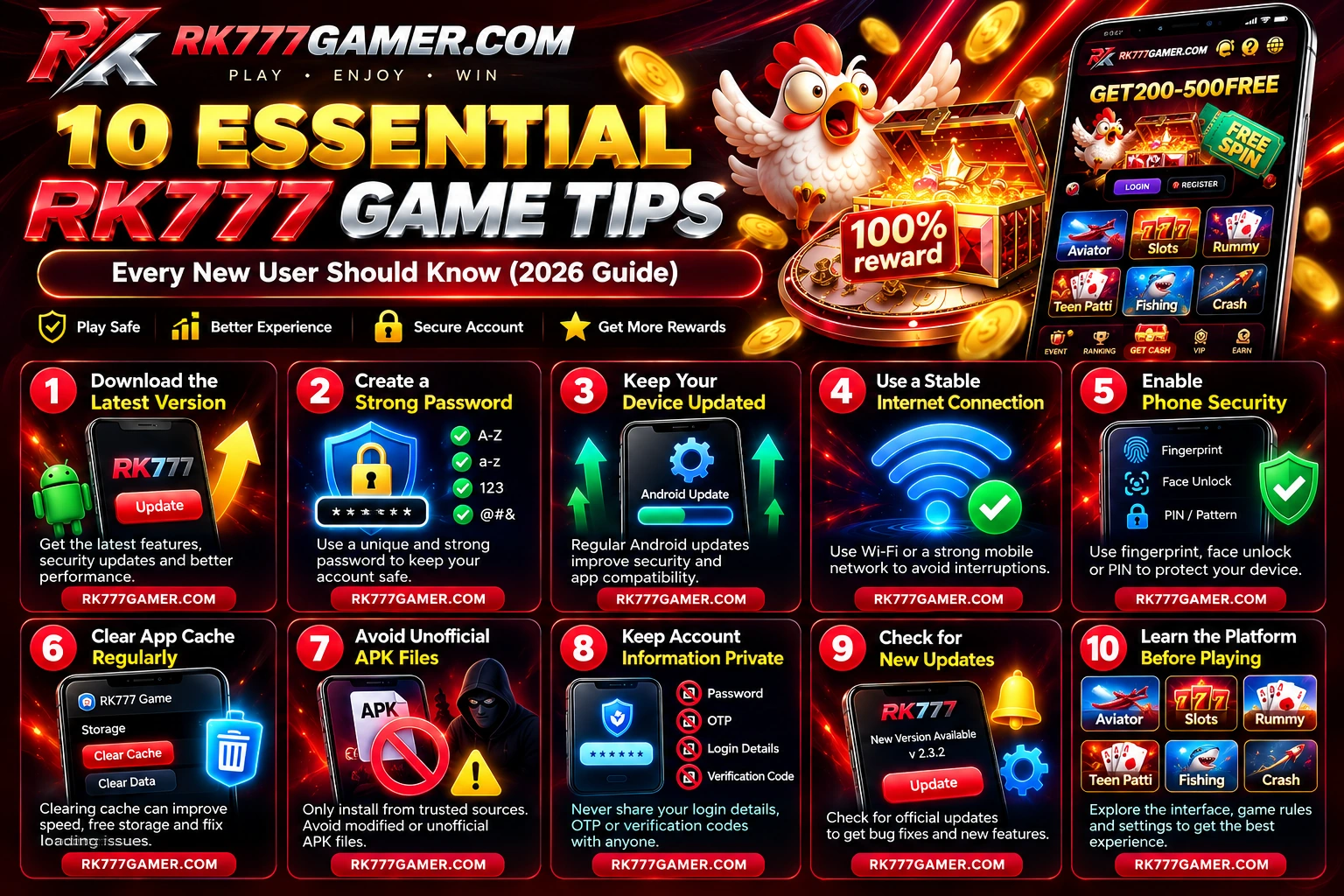
If you're new to RK777 Game, start with practical steps that protect your Android phone and account. Learning how to identify APK risks, handle mobile verification and navigate the app can prevent avoidable problems.
This guide covers ten beginner-friendly tips for RK777 users, from account protection to safer APK installation and everyday app troubleshooting.
Table of Contents
- Check the Latest RK777 Version
- Create a Strong Password
- Update Your Android Device
- Use a Stable Internet Connection
- Enable Phone Security
- Clear App Cache When Needed
- Avoid Unofficial APK Files
- Keep Account Details Private
- Review Updates and Notices
- Learn the Platform Before Playing
- Common Beginner Mistakes
- Frequently Asked Questions
1. Check the Latest RK777 Game Version
Review the version information shown by the download source before installing the app. Legitimate updates may resolve bugs or improve compatibility, but a page claiming “latest version” does not prove that a file is safe.
Compare the installer source, file details and Android warnings. For a step-by-step overview, read the RK777 Latest Version Guide.
2. Create a Strong RK777 Account Password
Use a unique password that you do not use for email, banking or other services. A long password or password-manager-generated passphrase is generally easier to protect than a short predictable one.
- Use a long, unique password with mixed characters.
- Do not use your name, birth date or phone number as the whole password.
- Never share the password with anyone claiming to provide support or rewards.
- Use available account protection and recovery settings.
Visit our RK777 Login Guide for the account-access overview.
3. Keep Your Android Device Updated
Android security patches can address vulnerabilities and help maintain app compatibility. Open Settings → System → Software update (the exact menu varies by phone) and install trusted security updates when available.
Also keep Google Play Protect enabled where supported. No phone update can independently guarantee that an APK is trustworthy.
4. Use a Stable Internet Connection
An unstable network can interrupt downloads or login verification. Try a reliable Wi-Fi or mobile network and allow a file download to finish fully before opening it.
Avoid entering passwords or payment information on networks you do not trust. If a page fails, check connectivity before repeatedly requesting verification codes.
5. Enable Phone Security
Enable a PIN, password, fingerprint or face-unlock setting. Keeping the screen locked reduces the risk that someone can access your apps if the phone is lost or borrowed.
Do not let unfamiliar people handle your device while a sensitive account screen is open.
6. Clear RK777 App Cache When Necessary
Temporary files can sometimes cause a page to load incorrectly. On many Android phones, open Settings → Apps → RK777 Game → Storage → Clear cache.
Important: Clear cache and Clear storage/data are different actions. Clearing storage/data may remove local settings and require logging in again. Check which button you are selecting.
7. Avoid Unofficial or Modified RK777 APK Files
Modified installers, “unlimited bonus” files and third-party prediction tools can expose users to malware, phishing or account theft. Do not bypass an Android security warning simply because a download page promises extra features.
- Confirm the source and publisher information where possible.
- Review requested app permissions before installing.
- Do not install files that security software flags as harmful.
- Be cautious of claims that any app can guarantee wins or profits.
Our RK777 APK Guide explains general APK installation checks.
8. Keep Your Account Information Private
Never share a password, SMS OTP, verification code or recovery detail with strangers, even if they claim to represent customer support or offer a bonus. Keep sensitive banking and payment data out of public chats.
If you receive a suspicious request, stop and verify it using a legitimate support route. Our Trust & Safety page covers related precautions.
9. Review App Updates and Settings
When you see a new update notification, review its source and information rather than updating blindly. If the app is slow, start with ordinary checks: network quality, remaining phone storage, system updates and the app cache.
For currently presented app information and download steps, see RK777 App and RK777 Download.
10. Learn the RK777 Platform Before Playing
Take time to understand the interface, settings, account menus and rules for any game you open. RK777 screenshots show categories such as Aviator, Rummy, Teen Patti, slots, fishing and other games; available categories can change.
Real-money gambling carries the possibility of losing money. Check age and location rules, set firm limits, and never regard bonuses or a previous result as a guarantee of future winnings. See Responsible Gaming before participating.
Common Mistakes RK777 Beginners Should Avoid
- Reusing a weak password
- Sharing SMS verification codes
- Ignoring device lock settings
- Trusting unknown modified APKs
- Ignoring Android warnings
- Confusing Clear cache with Clear data
Why These Tips Matter
These habits may help reduce common login problems, improve device hygiene and make app navigation easier. They cannot guarantee app security, uninterrupted access, payouts or any gaming outcome.
Frequently Asked Questions
How can I use RK777 Game more safely?
Use a trusted installation source, secure your Android device and account, and avoid sharing OTPs or personal information.
Should I install every RK777 APK update?
No. Verify the source and check the app information first. A new version number alone does not confirm authenticity.
Will clearing RK777 cache remove my account?
Clearing cache normally does not delete the server-side account, but clearing storage/data can remove local settings or sign-in state.
Can prediction tools guarantee RK777 winnings?
No. Claims of guaranteed profits or outcomes should be treated skeptically.
Does RK777 have a login guide?
Yes. The RK777 Login Page explains account-access options presented in the app.
Final Thoughts
Successful use of any Android app starts with sensible account and device practices. For RK777 beginners, a verified download source, strong password, security updates and familiarity with the interface are more useful than promises of quick rewards.
This independent guide does not confirm the legitimacy of a third-party download destination or guarantee any deposit, withdrawal or promotional offer.
Further reading: RK777 Review · Registration Guide · Privacy Policy.